Mix up a resume and a CV on the wrong application, and a recruiter notices before they read a single line of your experience. The two documents look similar at first glance, but they’re built for different readers, different countries, and different stages of a career.
A resume runs one to two pages and gets tailored to one job. A CV documents your entire academic and professional record and carries no page limit. Which one you actually need depends less on personal preference and more on two things: where you’re applying, and what field you’re in. The table below sorts out most of that confusion before you write a single word.
Resume vs CV at a Glance
| Category | Resume | CV |
| Length | 1–2 pages | No fixed length |
| Used for | Private-sector and public-sector jobs | Academic, research, medical, and international roles |
| Common in | US, Canada, Australia, New Zealand | UK, Ireland, mainland Europe, academia worldwide |
| Includes | Work experience, skills, education | Publications, research, teaching, grants, full education history |
| Layout | Designed, scannable | Plain, content-first |
| Updated | For each job application | Continuously, as your career grows |
What Is a Resume?
Think of a resume as a highlight reel, not a full record. It’s a concise document, usually one or two pages, that summarizes your work experience, skills, and education for a specific job. Employers in the US, Canada, Australia, and New Zealand rely on resumes for most private-sector and public-sector roles.
Six sections make up a typical resume:
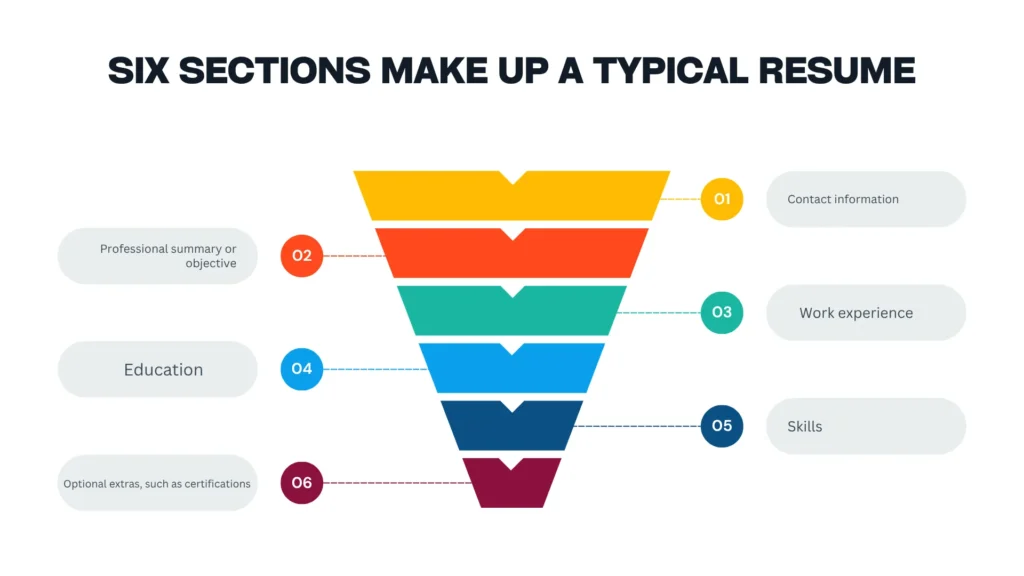
- Contact information
- Professional summary or objective
- Work experience
- Education
- Skills
- Optional extras, such as certifications, volunteer work, or projects
Resumes come in three formats. Chronological resumes list your jobs in reverse order, starting with your current role, and this is the safest choice for most applicants. Functional resumes group your skills by category instead of by job, which helps if you’re changing careers or have gaps in your history. Combination resumes blend both.
What Is a CV?
A CV runs longer because it’s answering a bigger question. Instead of “why should we hire you for this job,” it answers “what has your career looked like so far.” The term comes from the Latin curriculum vitae, meaning “course of life,” and employers request one for academic, scientific, medical, and research roles. International employers often expect a CV for standard job applications too, regardless of field.
Length isn’t fixed. A recent graduate’s first CV might run two pages. A professor with four decades of publications behind them can easily fill twenty.
What Is an Academic CV?
An academic CV takes the concept further still. It’s built specifically for university, research, or fellowship applications, and it presents your scholarly record in depth that a standard resume was never designed to hold. Expect to include some combination of these eight sections:
- Education
- Research experience
- Publications, listed in your field’s citation style
- Teaching experience
- Conference presentations
- Grants and fellowships
- Professional affiliations
- Academic references
Whether you lead with your degree or your professional experience depends on which one makes your case stronger for the specific role. Hiring committees weigh research output and teaching record more heavily than a short employment history, so structure the CV to put that record first. Anyone still weighing an academic path can explore the current Undergraduate Programs to see how a major connects to research opportunities down the line.
Resume vs CV: 7 Core Differences
Length gets the most attention when people compare a resume and a CV, but it’s only one of seven differences worth knowing before you write either one.
Length
A resume tops out at two pages, and one page is often better. A CV has no ceiling. It grows as your career does. If your resume is running long, the fix usually isn’t a smaller font. It’s cutting content that doesn’t serve the specific job you’re applying for.
Purpose and Audience
A single recruiter usually reads your resume, and they’re deciding whether you fit one open role. A CV often lands in front of a hiring committee, and they’re evaluating something closer to your trajectory: does your research direction, teaching history, or publication record suggest you belong in this field for the long haul?
Format and Layout
Resumes can afford to look designed. Bold headers, clean bullet points, and deliberate white space help a recruiter scan quickly. CVs, especially academic ones, go the other direction: plain formatting, minimal design, content doing all the work. Hiring committees care more about what’s on the page than how it’s styled.
Content and Sections
A resume sticks to work experience, skills, and measurable results. A CV adds sections a resume doesn’t have room for: publications, grants, conference talks, teaching history. Education gets different treatment too. A resume usually lists just your highest relevant degree, while a CV documents your full academic path.
Career Stage
If you’re early in your career or targeting private-sector roles, you need a resume. If you’re heading into academia, research, medicine, or applying for a grant or fellowship, you need a CV. Not sure which track fits your plans? Learn more about what a specific program expects from Graduate Admissions before you start writing.
Geographic Location
The same word means different things depending on where the job posting was written:
- United States and Canada: Employers expect a resume for most jobs, and a CV only for academic, medical, or research positions.
- United Kingdom, Ireland, New Zealand: Employers use the term CV for every job application, academic or not.
- Continental Europe: Employers treat CV as the standard term, though “resume” shows up occasionally.
- Australia, India, South Africa: Employers use the two terms interchangeably, with CV leaning toward public-sector use.
- Pakistan and Bangladesh: Some employers still request a “biodata” alongside or instead of a CV, a regional variation most resume guides skip entirely.
Cost of Reading
Here’s the part applicants underestimate: your document has to survive a first pass that’s shorter than most people expect. Ladders’ widely cited eye-tracking research put the average initial resume scan at around 7.4 seconds. The exact number shifts slightly across different studies and years, but the pattern holds. Recruiters skim in an F-shape, and a cluttered resume or a bloated CV makes that scan harder, not easier.
When Should You Use a Resume vs a CV?
Match your situation against the table below to settle most of the confusion in one look.
| Your situation | Send this |
| Applying for a private-sector job in the US or Canada | Resume |
| Applying for an academic, research, or medical role | CV |
| Applying for a job in the UK, Ireland, or New Zealand | CV |
| Applying for a job in mainland Europe | CV |
| Applying for a grant, fellowship, or PhD program | CV |
| Applying in Australia, India, or South Africa | Either works; CV suits public-sector roles better |
| Job posting doesn’t specify | Check the employer’s website, or ask the recruiter |
Once you know which document you’re sending, localize it. Switch the spelling convention, adjust the date format, and convert your degree classification to a GPA if you’re targeting a US employer.
How to Convert a Resume Into a CV
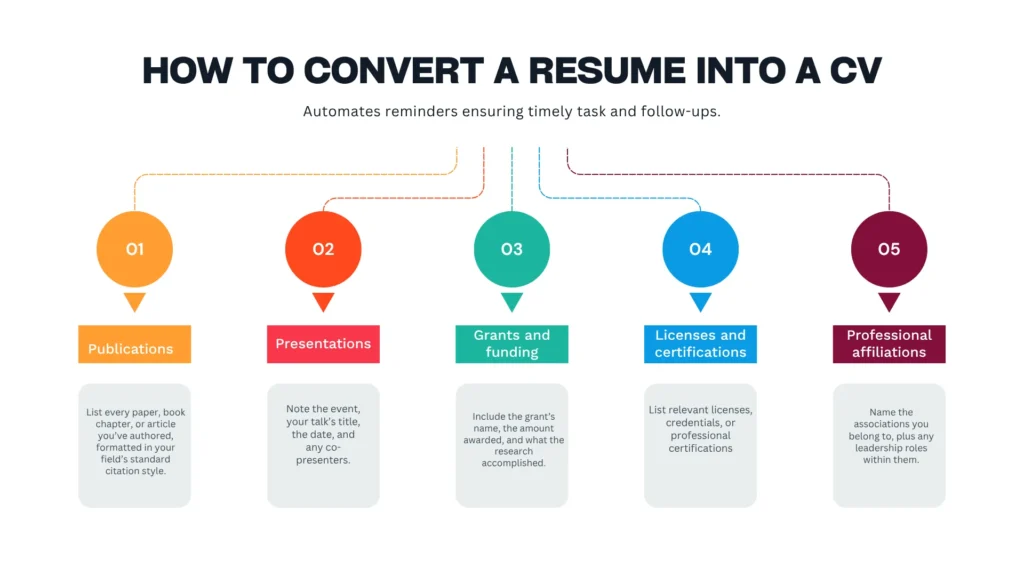
Turning a resume into a full academic CV isn’t a rewrite from scratch. It’s mostly addition, and these five sections cover most of what’s missing:
- Publications: List every paper, book chapter, or article you’ve authored, formatted in your field’s standard citation style.
- Presentations: Note the event, your talk’s title, the date, and any co-presenters.
- Grants and funding: Include the grant’s name, the amount awarded, and what the research accomplished.
- Licenses and certifications: List anything relevant to your field, such as a nursing license, a teaching credential, or a professional accreditation.
- Professional affiliations: Name the associations you belong to, plus any leadership roles within them.
Your education and volunteer sections carry over largely unchanged. Both documents present that information the same way.
8 Rules for Formatting a Resume or CV That Gets Noticed
Formatting decides whether your document gets read at all, before a recruiter even reaches your experience. These rules hold up whether a human is scanning your page or an applicant tracking system (ATS) is parsing it first.
Lead With Your Name and Contact Details
Put your full name, phone number, email address, and city at the very top of the page, formatted larger or bolder than the rest of the text. A recruiter should be able to reach you without hunting through paragraphs for that information, and an ATS parser reads this section first to build your candidate profile. Skip the “Address” line if you’re applying internationally. A city and country are enough, and a full street address can actually work against you with location-based filters.
Skip Multi-Column Layouts
Two-column resumes look sharp to a human eye, especially templates with a sidebar for skills or contact details. Most ATS software reads left to right, top to bottom, and a sidebar breaks that logic. Content in a column can get scrambled or dropped entirely before a human ever sees it. Stick to a single, straightforward column, and save the columns for spreadsheets, not resumes.
Match Your Verbs to Their Context
Every achievement needs a verb that fits what actually happened. Develop your skills, improve a process, secure funding, lead a team. These read as specific and credible. Generic verbs like “did,” “handled,” or “worked on” tell a recruiter nothing about your level of ownership. Search for the standard verb pairing in your field before you finalize a bullet, since some industries expect precise, almost technical phrasing.
Quantify What You Can
“Managed a team” tells a recruiter less than “managed a team of 12 and cut onboarding time by 30 percent.” Numbers do work that adjectives can’t, because they let a reader compare your impact against a baseline without asking follow-up questions. Attach a number to as many bullets as you honestly can: team size, budget, percentage improvement, timeline, or volume of output.
Leave Room to Breathe
A page crammed edge to edge with text signals to a recruiter that reading it will take real effort, and most will skip it during that first scan. Keep margins around half an inch, use consistent spacing between sections, and cap most bullet points at one or two lines. White space isn’t wasted space. It’s what makes the content you do include easier to absorb.
Tailor the Document Every Time
Reusing one resume for every application is the single most common reason strong candidates get filtered out early. Pull the exact keywords and phrases from the job posting and mirror them in your skills and experience sections, since ATS software matches against those specific terms rather than synonyms you might prefer. This takes fifteen minutes per application and meaningfully changes your odds.
Get a Second Set of Eyes on It
You’ve read your own resume too many times to catch every typo or awkward phrase. A second reader spots what you can’t, whether that’s a missing word, an inconsistent tense, or a section that doesn’t make sense to someone outside your field. A friend, a mentor, or the Writing Center can review a draft before you send it out.
Format for the Country You’re Applying In
A resume built for a US employer and a CV built for a UK one follow different conventions, and mixing them up is an easy way to signal that you haven’t done your homework. Match the spelling standard to the region, use the local page size, write dates in the format that the country expects, and drop or add a photo depending on local norms. Getting this right before you apply matters more than most applicants assume.
Formatting isn’t just a stylistic preference, either. A 2025 peer-reviewed study on automated resume screening found that formatting choices and keyword alignment measurably affect whether ATS software matches a resume to the right posting in the first place, since parsing tools depend on predictable structure to extract information correctly.
5 Common Resume and CV Mistakes to Avoid
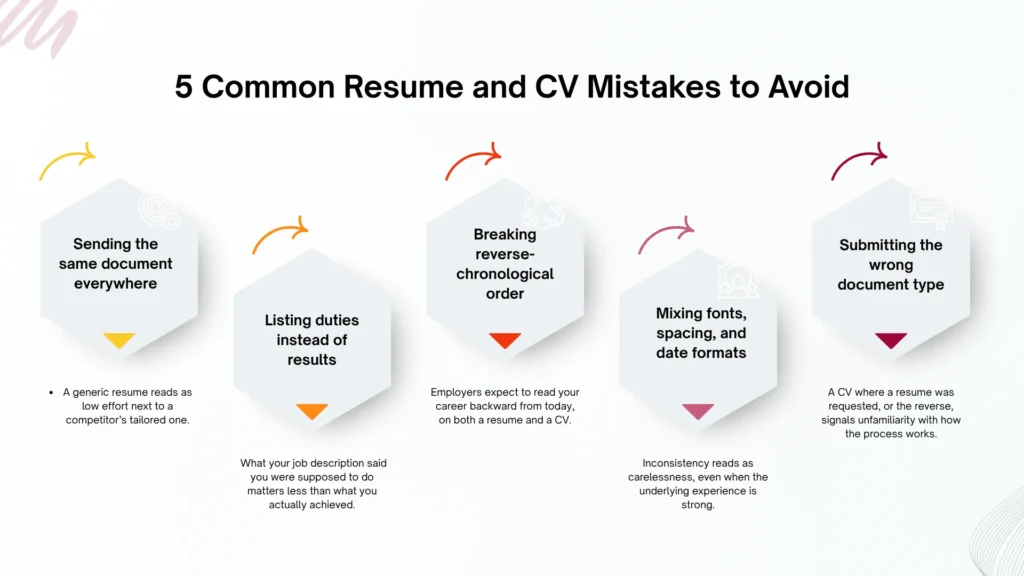
Most rejected applications don’t fail because of weak experience. They fail because of avoidable mistakes:
- Sending the same document everywhere: A generic resume reads as low effort next to a competitor’s tailored one.
- Listing duties instead of results: What your job description said you were supposed to do matters less than what you actually achieved.
- Breaking reverse-chronological order: Employers expect to read your career backward from today, on both a resume and a CV.
- Mixing fonts, spacing, and date formats: Inconsistency reads as carelessness, even when the underlying experience is strong.
- Submitting the wrong document type: A CV where a resume was requested, or the reverse, signals unfamiliarity with how the process works.
There’s a harder truth here too. Formatting and effort only go so far. A landmark field experiment published by the National Bureau of Economic Research sent nearly identical resumes to real job postings, changing only the applicant’s name. Resumes with white-sounding names received 50 percent more callbacks than resumes with Black-sounding names, despite matching qualifications and formatting. It’s worth knowing that even a well-built resume operates inside a hiring system that isn’t always neutral, and that no formatting choice fixes that on its own.
Cover Letter vs CV vs Resume: What’s the Difference?
Three documents, three jobs. Your resume or CV lists what you’ve done, structured for a fast read. Your cover letter explains why you want this specific role and how your background connects to it, something no bullet-point list can really do. Academic employers who request a CV will almost always want a cover letter alongside it, since the CV documents your record but doesn’t explain your motivation.
Get Your Document Reviewed
A second opinion catches what you can’t see in your own writing. Students can book a free one-on-one session with the Career Center to review a resume or CV before it goes out, or talk through career-track questions with Academic Advising if you’re still deciding which document fits your plans. If you can’t find what you’re looking for here, reach out to our team, and someone will point you in the right direction.
Frequently Asked Questions
If you’re applying for a US job on a tight deadline and don’t have time to convert your document, yes, a hiring manager will still read it. A tailored resume will still perform better if you have the time to make one.
A standard, non-academic CV runs one to two pages. An academic CV has no fixed length; it grows with your publication and research record over time.
If you’re applying to academic and industry positions in the same job search, yes. Keep both current and tailor each one to the specific application rather than reusing one for both.
A CV summarizes your qualifications in text. A portfolio shows the work itself, such as designs, writing samples, or case studies, and matters most in creative and technical fields.
Not quite. A biodata, common in South Asian job markets, often includes personal details like date of birth and marital status that a standard CV or resume leaves out. Some employers in Pakistan and Bangladesh still request one specifically, so check the posting before you send a regular CV instead.
It depends on the country. Employers in mainland Europe sometimes expect a photo on a CV. In contrast, US and UK employers generally prefer you leave it off to avoid any appearance of bias in early screening.
Length itself doesn’t hurt you, but padding does. ATS software matches keywords against the job posting, so a shorter resume packed with relevant terms will often outperform a longer one full of filler.